Hacker News
- 4.0
- Rating
- 10.00K
- Installs
- Free
- Price

 Analysis by App-foxy
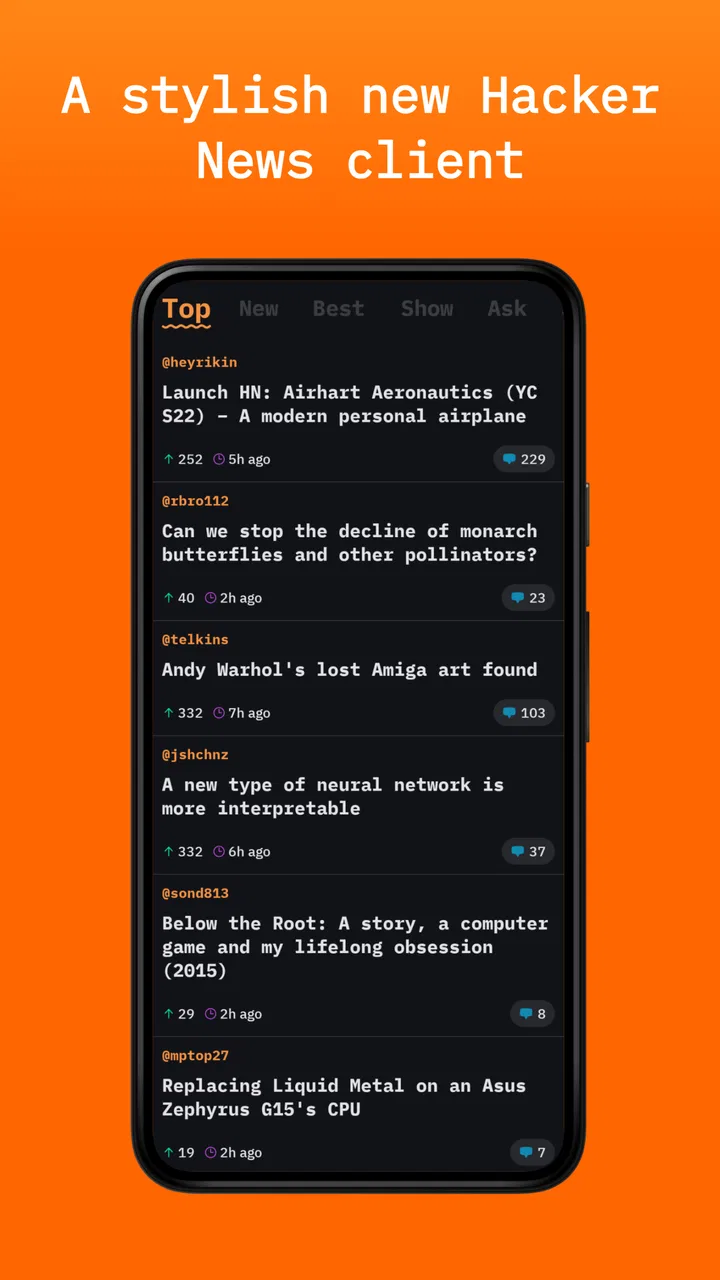
I like news readers that get out of the way, and Hacker News is clearly aimed at that kind of reader. This free app from Emerge Tools focuses on Hacker News rather than trying to become a general news hub, so its value depends on whether you want a direct way to follow the discussions, links, and technical conversations around that community. I found the appeal strongest when I wanted to check what people were talking about without opening a browser and rebuilding the same routine every time.
That narrow purpose is also the first thing to understand. This is not a broad magazine app with multiple publications, personalized lifestyle sections, or a large collection of unrelated topics. It belongs in the News & Magazines category, but its identity is much more specific: it is an open-source Hacker News reader. If you already enjoy the site and want a focused mobile entry point, it makes sense. If you are looking for a conventional headline reader, it may feel too limited.
What using Hacker News feels like in everyday reading
My first impression was that the app works best as a quick-check tool rather than a place where I would spend an entire evening. I could open it during a coffee break, scan the current discussions, and decide which links deserved more attention. That simple pattern matters because Hacker News can be overwhelming when every item looks potentially useful. A dedicated reader gives the habit a clear boundary: browse, choose, read, and leave.
You May Also Like

 Pandora - Music & Podcasts
Pandora’s Music Is Easy to Start, but Harder to Recover
Pandora’s strength is its low-effort path from a seed to a station. Its weak spot is how much confidence it asks you to place in connection, setup, and quiet recovery.

 AccuWeather: Weather Radar
AccuWeather Review: A Quick, Clear Forecast for Everyday Decisions
For everyday plans, the best forecast is the one you can understand quickly. AccuWeather makes rain timing, radar, and local conditions easy to act on, with a few trade-offs.

 Hill Climb Racing
Why Hill Climb Racing Still Turns Crashes Into One More Run
A tiny car, a bumpy hill and one more upgrade: Hill Climb Racing keeps resurfacing because its simple chaos makes every near-miss feel personal.

 AliExpress - Shopping App
AliExpress Makes Global Shopping Feel Personal, but Shoppers Bear the Risk
AliExpress turns a global marketplace into a pocket-sized discovery engine. Its reach is useful, its shopping loop compelling, and its trade-offs easy to miss.

 Lords Mobile: Kingdom Wars
Lords Mobile Is a Kingdom-Building Routine, Not a Quick Match
A case-by-case verdict on the building, battles, device demands, and social commitments that make Lords Mobile rewarding for some players and exhausting for others.

 PDF Scanner app - TapScanner
TapScanner Makes Paperwork Easier to Capture, Check, and Share
TapScanner makes scanning with a phone feel less like a rescue operation and more like a dependable step in getting work done. Its capture tools are useful, though not flawless.
More From Our News Desk
View All News


The app is developed by Emerge Tools, and its open-source identity is relevant even if you never inspect the code. It signals a different priority from a heavily commercial news product. The experience is centered on access to Hacker News content, not on pushing a broader media ecosystem around it. For readers who prefer a focused utility, that restraint is welcome.
There is a practical trade-off, though. A focused reader cannot solve the basic problem of Hacker News itself: the front page mixes programming, startups, science, business, culture, and personal essays, often with very different levels of usefulness. The app can make browsing more convenient, but it does not automatically turn that stream into a carefully edited newsletter. I still had to judge titles, open the interesting items, and decide which discussions were worth my time.
One useful habit is to separate scanning from reading. I use the app for the first pass, looking for subjects that match what I need that day. If an article is important, I continue with it deliberately instead of opening every promising headline. This avoids the common Hacker News trap of spending half an hour collecting tabs without finishing anything.
Where new users can get stuck
The most likely point of friction is expecting a full news service from a specialized reader. Someone installing it because they want world news, sports, local reporting, or several publications in one place may think the app is missing something. It is not trying to replace those services. Its usefulness begins with an existing interest in Hacker News.
Another possible stumbling block is the difference between a discussion reader and a traditional article reader. Hacker News items often lead to outside websites, while the conversation around those links lives in the Hacker News thread. That means the reading experience can feel split: the app helps you discover and follow the discussion, but the linked article may have its own layout, loading behavior, and mobile limitations.
I also recommend giving the app a fair test during more than one kind of session. A quick morning scan tells you whether the list is comfortable to browse. A longer session tells you whether moving between a discussion and its linked material fits your habits. Those are different tests, and passing one does not guarantee the other will feel equally smooth.
The age classification is Everyone 10+, which fits an app built around public technology and internet discussions, but it should not be confused with a guarantee that every linked page will suit every reader. The app leads to a wider web environment, and outside articles may use language, subjects, or comment sections that vary considerably.
Simple setup checks before judging the app
Because the current version is 1.0.6 and the minimum operating system is iOS 11, I would begin with compatibility rather than troubleshooting the reading experience. If the device meets that requirement, install the app normally and open it once before forming an opinion. A first launch is a poor time to assume that every delay or blank screen is a permanent app problem.
Check the basics in a sensible order. Confirm that the device has a working internet connection, try another ordinary webpage, and reopen the app if the initial content does not appear immediately. This is not glamorous advice, but it prevents a temporary connection issue from being mistaken for a design flaw. A reader whose main job is fetching current discussions naturally depends on network access.
If the app opens but the content seems stale, close and relaunch it before repeatedly tapping controls. If the problem affects the whole device, test another app that uses the internet. If only one linked page fails, return to the Hacker News list and try a different item. That distinction quickly tells you whether the problem is with the reader, the external site, or the connection between them.
I would also keep the first session deliberately small. Open a few items, return to the list, and repeat the process. This gives you a clearer sense of navigation and makes it easier to identify the exact step that causes trouble. Installing an app and immediately trying to process a long list makes it harder to tell whether the problem is usability, network speed, or simple unfamiliarity.
There is no need to build a complicated setup routine around this app. Its appeal is that it can become a lightweight shortcut into an existing reading habit. If you need extensive account management, cross-device organization, or a carefully tuned feed, you should assess that requirement before committing to it rather than hoping a minimal reader will grow into a full research platform.
Recovering a reading workflow when something goes wrong
When a session breaks, I find it more effective to recover the workflow than to keep forcing the same screen. If a linked article does not load, go back to the discussion list and open another item. If the list itself does not refresh, pause and test the connection elsewhere. If the app becomes unresponsive, close it completely and start again. These steps sound basic, but they preserve the useful part of the session instead of turning a small problem into a reason to abandon the app.
A good recovery method is to note where the failure happens. Does the app fail before the list appears, while opening a discussion, or only after leaving Hacker News for an external page? Each point suggests a different cause. A failure before the list appears points toward the app or connection. A failure on one outside article points more naturally toward that website. A failure after extended browsing may be a temporary device or network issue rather than a permanent limitation of the reader.
I also recommend avoiding rapid repeated taps when a page is slow. That can create a confusing sequence of loading states and make it difficult to know which action finally worked. Tap once, wait briefly, and use the back action if the result is clearly not what you wanted. This is especially useful when moving between a discussion and an external article, where loading speed may vary from site to site.
For a more reliable routine, I would use the app in two passes. First, scan titles and select only a small group. Second, read those selections one at a time. If an external page is unavailable, keep the discussion as a placeholder and return later rather than repeatedly retrying it. This approach is more efficient than treating every item as an urgent reading task.
One non-obvious advantage of this method is that it reduces the influence of headline momentum. Hacker News can make a long list of interesting links feel like a queue that must be cleared. By choosing a limited group before opening anything, I make a more deliberate decision about what deserves attention. The app becomes a filter for my own time, even though it is not a personalized editorial service.
When the app is not the cause of the problem
It is easy to blame a reader when an article refuses to open, but external pages are often the real variable. A linked site may be slow, temporarily unavailable, formatted poorly for a small screen, or protected by its own access rules. If other items open normally, that is a strong practical clue that the reader is doing its main job and the problem belongs to the destination.
The same applies to comment loading or discussion behavior. Hacker News is a live service, so content can change while you are browsing. A thread that looked active earlier may appear different later, and a link that worked in one session may be unavailable in another. I would not judge the entire app from one unusual item. Test several unrelated discussions before deciding that there is a broad failure.
Network switching can also create misleading symptoms. Moving between mobile data and Wi-Fi during a session may interrupt a page or leave an incomplete view. If the app behaves normally after reopening on a stable connection, the interruption was probably environmental. This kind of check is especially worthwhile before reinstalling, because reinstalling rarely fixes a temporary network problem.
Readers should also separate content discomfort from app quality. Hacker News discussions can be technical, argumentative, or far outside a casual reader’s interests. An unhelpful thread does not mean the interface failed. Conversely, an excellent article does not prove that the app is the right long-term reader for you. I judge the app by how easily it helps me discover, open, and return from that material.
Who will get the most from it
I would recommend Hacker News to someone who already checks Hacker News in a browser and wants a more direct mobile routine. It is particularly suitable for developers, founders, technology students, researchers, and curious readers who enjoy following links back to their surrounding discussions. The app’s focused scope can make a habitual check feel less cluttered than opening a general browser session.
It can also work well for a reader who wants a short daily technology briefing without subscribing to a publication. The important distinction is that the app gives you access to a community-driven stream rather than a finished editorial package. You gain variety and immediacy, but you also take responsibility for choosing what is credible, relevant, and worth reading.
I would be more cautious if your main goal is offline reading, extensive article organization, a unified feed from many sources, or a polished magazine-style experience. Those needs point toward a broader news reader or a browser workflow with tools for saving and organizing pages. This app is better when the destination is specifically Hacker News, not when Hacker News is only one small part of a larger information system.
The free price makes experimentation easy, and the store audience is still relatively modest: the app has passed ten thousand installs, with an average score of four out of five from around thirty-three ratings. I read that as encouraging but limited evidence. The rating suggests that users generally find value in it, while the small review pool means I would rely more on my own reading habits than on the score alone.
My practical verdict after using it
The best reason to install Hacker News is its narrowness. It does not need to compete with every news app because it serves a specific purpose: giving mobile readers a focused way into Hacker News. When that purpose matches your routine, the simplicity feels useful. I can open it for a quick scan, follow a discussion, and leave without first navigating a large collection of unrelated sections.
Its limitations are the same ones that come with that focus. It is not a substitute for a general news service, and it cannot control the quality, speed, or layout of every external page reached through a Hacker News item. Readers who expect a complete reading-management system may eventually prefer a browser or a broader app. Readers who want a dedicated Hacker News doorway are more likely to appreciate the straightforward approach.
After working through the likely setup and recovery issues, my recommendation is positive but specific. Try it if Hacker News is already part of your information diet, especially if you want a free, open-source-oriented reader from Emerge Tools rather than another broad content platform. Start with short sessions, test both discussions and external links, and judge it by whether it makes your existing habit easier.
For me, that is the deciding point. The app does not need to transform Hacker News into something it is not. It only needs to make checking the community convenient and dependable enough to fit into an ordinary day. If that is the job you want done, Hacker News is worth trying. If you want a complete news ecosystem, I would choose a different option and keep this one for focused technology browsing.
FAQs for Hacker News
01What is Hacker News, and what can I do with the app?
Hacker News is a technology-focused news and discussion platform operated by Y Combinator. The app typically lets you browse stories about programming, startups, science, cybersecurity, artificial intelligence, and the wider technology industry. You can read articles, view comments, vote on submissions, save or share links, and follow conversations. It is designed for people who prefer concise, community-driven content rather than a traditional editorial news feed.
02Is the Hacker News app official, and is it free to use?
The Hacker News website is publicly available and free to browse, but mobile applications using the Hacker News name may be independent, third-party clients rather than an official Y Combinator product. Before downloading, check the developer name, store description, permissions, update history, and privacy policy. Most clients offer basic reading access without payment, although some may include optional purchases, advertising, or premium features.
03Do I need an account to read stories and comments?
Usually, you can browse Hacker News stories, open linked articles, and read discussions without creating an account. An account is generally required if you want to submit stories, comment, vote, or use account-based features such as favorites or personalized reading lists. Registration is handled through Hacker News or the specific client you install, so available login options and synchronization may differ between applications.
04What type of content and discussions can I expect on Hacker News?
Hacker News mainly features technology, software development, entrepreneurship, research, business, and startup-related stories. Discussions can be highly informative, with experienced users sharing technical explanations, professional opinions, and links to additional sources. However, the community may also include strong disagreements, dense terminology, and occasional off-topic or controversial comments. Readers should evaluate claims independently and remember that user discussions are not always verified news.
05Are there any privacy, security, or usability concerns before downloading a Hacker News client?
Privacy and security depend largely on the particular mobile client, not only on Hacker News itself. Review the permissions requested and avoid apps asking for unnecessary access to contacts, location, files, or device functions. Check whether the app uses secure connections, explains data collection, and receives regular updates. Also consider usability: some clients provide excellent dark mode, offline reading, and notifications, while others may offer only a basic web wrapper.
Pros
- Fast access to the latest technology and startup news
- Clean
- lightweight interface that works well on older devices
- Discussion threads often provide expert opinions and useful context
- Easy to save interesting stories for later reading
- Minimal distractions and no algorithm-heavy social feed
Cons
- Some discussions can become technical or difficult for newcomers
- Story quality depends heavily on community voting
- Older or niche articles may receive little visibility
- Limited multimedia content compared with mainstream news apps
- Frequent updates can make the front page feel repetitive

Hacker News
Gallery